SQL Server
Your First SELECT Query in SQL Server
Write and run your first T-SQL queries in SSMS: SELECT and FROM, choosing columns, TOP, reading the results grid and Messages tab, a first look at WHERE and ORDER BY, and the errors every beginner hits.
On this page
You can connect to SQL Server and you know your way around Object Explorer. Now it is time to ask the database a question.
In SQL Server, questions are written in T-SQL (Transact-SQL), Microsoft’s dialect of SQL, and the statement that reads data is SELECT. This lesson, the third step of SQL Server Foundations, takes you from an empty query window to a handful of queries you understand line by line.
The practice table
Every lesson in this series uses the same small, synthetic database: JaviBuildsLab, with a Customers table for the early customer examples and an Orders table for the order examples.
| Column | Type | Meaning |
|---|---|---|
CustomerId |
int |
Unique number for each customer (the primary key) |
FirstName |
nvarchar(50) |
First name |
LastName |
nvarchar(50) |
Last name |
City |
nvarchar(60) |
City |
State |
char(2) |
Two-letter US state code |
Email |
nvarchar(254) |
Email address, empty (NULL) for one customer |
CreatedDate |
date |
When the customer was added |
If you want to run the examples yourself, run this script once on a local or development instance. It only creates things that are missing, never deletes anything, and is safe to run twice. You do not need to understand every line yet: creating tables and inserting rows have their own lessons later.
To reproduce the Orders screenshots as well as the customer examples, use the complete JaviBuildsLab setup script. The shorter block below creates the Customers table used in the first examples.
-- Practice data for SQL Server Foundations (synthetic; safe to run more than once).
IF DB_ID(N'JaviBuildsLab') IS NULL
    CREATE DATABASE JaviBuildsLab;
GO

USE JaviBuildsLab;
GO

IF OBJECT_ID(N'dbo.Customers', N'U') IS NULL
BEGIN
    CREATE TABLE dbo.Customers
    (
        CustomerId  INT           NOT NULL CONSTRAINT PK_Customers PRIMARY KEY,
        FirstName   NVARCHAR(50)  NOT NULL,
        LastName    NVARCHAR(50)  NOT NULL,
        City        NVARCHAR(60)  NULL,
        State       CHAR(2)       NULL,
        Email       NVARCHAR(254) NULL,
        CreatedDate DATE          NOT NULL
    );
END;
GO

IF NOT EXISTS (SELECT 1 FROM dbo.Customers)
BEGIN
    INSERT INTO dbo.Customers (CustomerId, FirstName, LastName, City, State, Email, CreatedDate)
    VALUES
        (1,  N'Ana',   N'Torres', N'Miami',    'FL', N'ana.torres@example.com',   '2025-01-14'),
        (2,  N'Ben',   N'Carter', N'Austin',   'TX', N'ben.carter@example.com',   '2025-02-03'),
        (3,  N'Chloe', N'Martin', N'Seattle',  'WA', N'chloe.martin@example.com', '2025-02-21'),
        (4,  N'David', N'Kim',    N'Orlando',  'FL', N'david.kim@example.com',    '2025-03-09'),
        (5,  N'Emma',  N'Lewis',  N'Denver',   'CO', N'emma.lewis@example.com',   '2025-04-02'),
        (6,  N'Farid', N'Haddad', N'Tampa',    'FL', N'farid.haddad@example.com', '2025-04-18'),
        (7,  N'Grace', N'Wu',     N'Portland', 'OR', N'grace.wu@example.com',     '2025-05-06'),
        (8,  N'Hugo',  N'Silva',  N'Dallas',   'TX', N'hugo.silva@example.com',   '2025-05-27'),
        (9,  N'Isla',  N'Brooks', N'Boston',   'MA', NULL,                        '2025-06-11'),
        (10, N'Jonas', N'Weber',  N'Chicago',  'IL', N'jonas.weber@example.com',  '2025-06-30');
END;
GOAfter it runs, right-click Databases in Object Explorer and select Refresh to see JaviBuildsLab appear.
Open a query window
As in the previous lesson, right-click JaviBuildsLab in Object Explorer and select New Query. Check the database drop-down in the toolbar: it should say JaviBuildsLab. That is the database your queries will run in.
To run a query, press F5 or select Execute. If you highlight part of the text first, SSMS runs only the highlighted part, which is useful once a window holds several queries.
Your first query: SELECT * FROM
Type this and press F5:
SELECT *
FROM dbo.Customers;The same SELECT pattern works with any table; this SSMS example reads from dbo.Orders in JaviBuildsLab.
The complete setup script creates both Customers and Orders in JaviBuildsLab. The SSMS capture runs this Orders query:
SELECT *
FROM [JaviBuildsLab].[dbo].[Orders];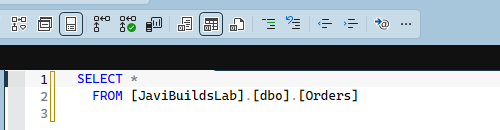
The dbo.Customers example above returns ten rows. Here is what each piece means:
SELECTstarts a query that reads data. It is followed by the list of columns to return.*means all columns, in the order they are defined in the table.FROMnames where the rows come from.dbois the schema andCustomersis the table. Together,dbo.Customersnames exactly one table.;ends the statement. T-SQL does not require the semicolon in most places, but it is a good habit: it makes it obvious where one statement ends, and a few newer statements need it.
Keywords are not case-sensitive, so select * from dbo.customers also works on most servers. Writing keywords in uppercase is a convention that makes queries easier to scan.
- SELECT CustomerId, FirstName
- Columns to return
- FROM dbo.Customers
- Source table
Reading the results
Below the query editor, SSMS shows two tabs.
This separate SSMS query uses TOP (1000) against dbo.Orders in the synthetic JaviBuildsLab database.
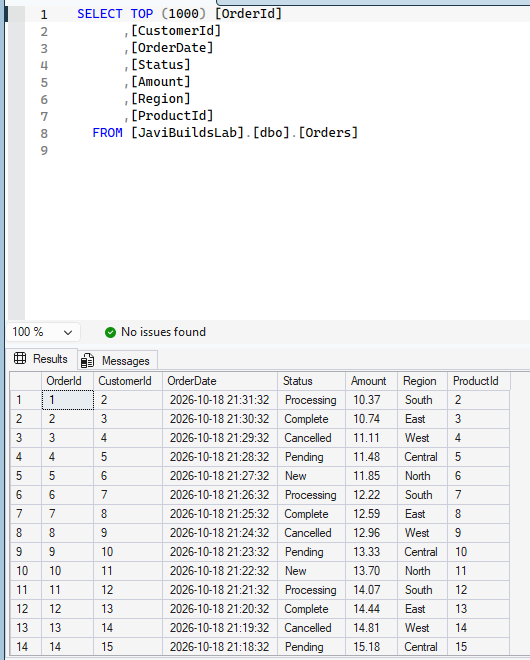
Results is a grid. Each horizontal line is a row, each vertical one is a column, and together they form the result set of the query. The column headers come from the column names. In the dbo.Customers example above, each row is one customer; Isla Brooks has no email, so her Email cell shows NULL, which means no value, not an empty string. The separate SSMS capture above shows order rows from dbo.Orders. NULL has its own lesson later.
Messages shows what SQL Server said about the execution: (10 rows affected) on success, or the error text when something goes wrong. When a query “does nothing”, look at Messages before anything else.
The status bar at the bottom confirms the server, the login, the database and the number of rows returned. It is another quick way to check you ran the query where you meant to.
Choose the columns you need
SELECT * is perfect for a first look at a table. In real queries, list the columns you need:
SELECT
    CustomerId,
    FirstName,
    LastName,
    City,
    State
FROM dbo.Customers;This SSMS capture uses dbo.Orders in JaviBuildsLab and lists the columns it will return.
SELECT
    OrderId,
    CustomerId,
    OrderDate,
    Status,
    Amount,
    Region,
    ProductId
FROM [JaviBuildsLab].[dbo].[Orders];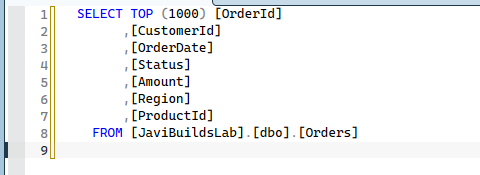
Columns are separated by commas, and they come back in the order you list them. There are good reasons to prefer an explicit list:
- You return only what you use. On a ten-row table it makes no difference. On a table with millions of rows and wide text columns, reading and sending columns nobody looks at costs time.
- The result is predictable. If someone adds a column to the table next month,
SELECT *silently returns it too, which can break a report or an application that expected a fixed shape. - The query documents itself. A reader can see which data the query depends on.
None of this makes SELECT * forbidden. It is the right tool for exploring a table, checking a few rows, or running a quick ad hoc question. Just do not leave it in code that other people or programs depend on.
Look at a few rows with TOP
On a large table, you rarely want every row just to see what the data looks like. TOP limits how many rows come back:
SELECT TOP (10)
    CustomerId,
    FirstName,
    LastName
FROM dbo.Customers;Our table has exactly ten rows, so this returns all of them. Try TOP (3) to see the effect.
One detail matters early: without an ORDER BY, SQL Server does not promise which rows TOP returns. Today you may get customers 1, 2 and 3 because of how the table is stored; tomorrow, on a bigger table, you may not. Use TOP alone to peek at data, and add ORDER BY (below) when you need specific rows, such as “the ten newest customers”.
A first look at WHERE
WHERE keeps only the rows that match a condition. Here is a single example:
SELECT
    CustomerId,
    FirstName,
    LastName,
    City
FROM dbo.Customers
WHERE State = 'FL';Three customers come back: Ana Torres in Miami, David Kim in Orlando and Farid Haddad in Tampa. Text values go between single quotes. Comparisons, combining conditions with AND and OR, ranges, and patterns get a dedicated WHERE lesson later in the path.
A first look at ORDER BY
ORDER BY sorts the result. It goes at the end of the query:
SELECT
    CustomerId,
    FirstName,
    LastName,
    City
FROM dbo.Customers
WHERE State = 'FL'
ORDER BY LastName;| # | CustomerId | FirstName | LastName | City |
|---|---|---|---|---|
| 1 | 6 | Farid | Haddad | Tampa |
| 2 | 4 | David | Kim | Orlando |
| 3 | 1 | Ana | Torres | Miami |
The same three customers now come back in alphabetical order by last name: Haddad, Kim, Torres. Without ORDER BY, a result has no guaranteed order at all, even if it often looks sorted. Descending order, sorting by several columns and the interaction with TOP are covered in the ORDER BY lesson.
Format queries so people can read them
SQL Server ignores line breaks and extra spaces. These two queries are identical to the engine:
select customerid,firstname,lastname from dbo.customers where state='FL' order by lastname;

SELECT
    CustomerId,
    FirstName,
    LastName
FROM dbo.Customers
WHERE State = 'FL'
ORDER BY LastName;Only one of them is pleasant to read, change or review. A simple style is enough: keywords in uppercase, each clause (SELECT, FROM, WHERE, ORDER BY) on its own line, and one column per line, indented. It also makes the next lesson easier, because each clause sits visibly in its own place.
Comments
Comments are notes for humans; SQL Server skips them. Two styles exist:
-- Customers in Florida, sorted by last name.
SELECT
    CustomerId,
    FirstName,
    LastName   -- City is not needed for this check
FROM dbo.Customers
WHERE State = 'FL'
ORDER BY LastName;

/*
   A block comment can span several lines.
   Useful for a short explanation at the top of a script.
*/-- comments out the rest of a line. /* ... */ comments out everything between the markers. A quick trick while testing: put -- in front of a line to switch it off without deleting it.
Errors every beginner hits
Errors appear in the Messages tab in red, with a line number. Double-clicking the message usually jumps to the line.
Wrong database. “Invalid object name ‘dbo.Customers’.” The most common error of all. Check the database drop-down in the toolbar: if it says master, you are querying the wrong database. Switch it to JaviBuildsLab.
Misspelled or wrong table name. The same “Invalid object name” error appears for dbo.Customer or dbo.Custmers. Expand the Tables folder and compare the exact name.
Wrong schema. If the table is sales.Customers and you wrote dbo.Customers, SQL Server looks in the wrong schema and fails the same way. Check the prefix in Object Explorer.
Misspelled column. “Invalid column name ‘Fristname’.” Expand the table’s Columns folder to check the spelling.
Missing comma. Forget the comma between two columns, as in FirstName LastName, and SQL Server does not complain: it treats LastName as a new header for the FirstName column. You get one column called LastName full of first names. If a result looks oddly narrow, check your commas.
Extra comma. A comma after the last column, just before FROM, gives “Incorrect syntax near the keyword ‘FROM’.”
Wrong quotes. Text needs single quotes: 'FL'. Double quotes mean an identifier (a name), so WHERE State = "FL" produces “Invalid column name ‘FL’.” Curly quotes pasted from a document or chat app also break queries; retype them in SSMS.
Right query, wrong server. Not an error message, just wrong results. If the numbers look strange, check the status bar: server, login and database. With several query windows open, it is easy to run a query on the wrong connection.
Next lesson
You can now write a SELECT that reads specific columns from a table, limit the rows with TOP, keep the rows you want with WHERE, sort them with ORDER BY, and read the result. The next lesson, Understanding the Parts of a SELECT Statement in SQL Server, looks at each clause in more depth and how they fit together. The complete path is on the SQL Server Foundations hub.
If you skipped ahead, the earlier steps are How to Connect to SQL Server with SSMS and How to Find and Navigate a Database in SSMS.
Check what you learned
2 quick questions
SQL Server Foundations
Lesson 3 of 25
Was this helpful?
What could be better?
Thanks — that helps me improve Javi Builds.
Continue learning
- Cheat sheetFind High CPU QueriesIdentify SQL Server queries consuming the most CPU now and historically, distinguish total CPU from CPU per execution, and choose the right next tuning step.Open cheat sheet
- RoadmapSQL Server FoundationsWrite and run your first T-SQL queries in SSMS: SELECT and FROM, choosing columns, TOP, reading the results grid and Messages tab, a first look at WHERE and ORDER BY, and the errors every beginner hits.View roadmap
What should I build next?
I'm building Javi Builds around practical problems data engineers actually face. Tell me what you'd like to see next.
Stay in the loop
Get the Javi Builds updates you actually care about.
Check your inbox
I sent you a confirmation link. Your subscription will be active after you confirm it.