Microsoft Fabric
Create Your First Microsoft Fabric Workspace
Create a Microsoft Fabric development workspace step by step, with sensible decisions about capacity, workspace roles, naming, ownership and Git readiness from the start.
On this page
Every Microsoft Fabric item lives in a workspace. Lakehouses, notebooks, pipelines, Warehouses, semantic models and reports are all created inside one, secured by its roles, and run on the capacity it is assigned to. Creating a workspace takes a minute. Creating one you will not have to rebuild later takes a few decisions first.
In this tutorial you create jb-fabric-dev, a development workspace used for the rest of the Microsoft Fabric learning path. Along the way you will see how workspaces relate to OneLake and capacity, what each workspace role allows, and how a production organization would structure the same thing.
If you are new to Fabric’s building blocks, start with What Is Microsoft Fabric? A Practical Overview.
What a Fabric workspace is
A workspace does three jobs at once:
- A container. It holds items: Lakehouses, Warehouses, notebooks, pipelines, semantic models, reports and more. Items can be grouped into folders inside the workspace.
- A collaboration and security boundary. People get access through workspace roles. A role applies to every item in the workspace unless item-level permissions say otherwise.
- A unit of deployment and compute. A workspace is assigned to one capacity, and it is the unit you connect to Git and promote between environments.
Here is what a small workspace looks like in practice. This is ws_demo, the demo workspace from the Microsoft Fabric notebook tutorial: one Lakehouse, the SQL analytics endpoint that Fabric created for it, and one notebook. The jb-fabric-dev workspace you create below starts empty.
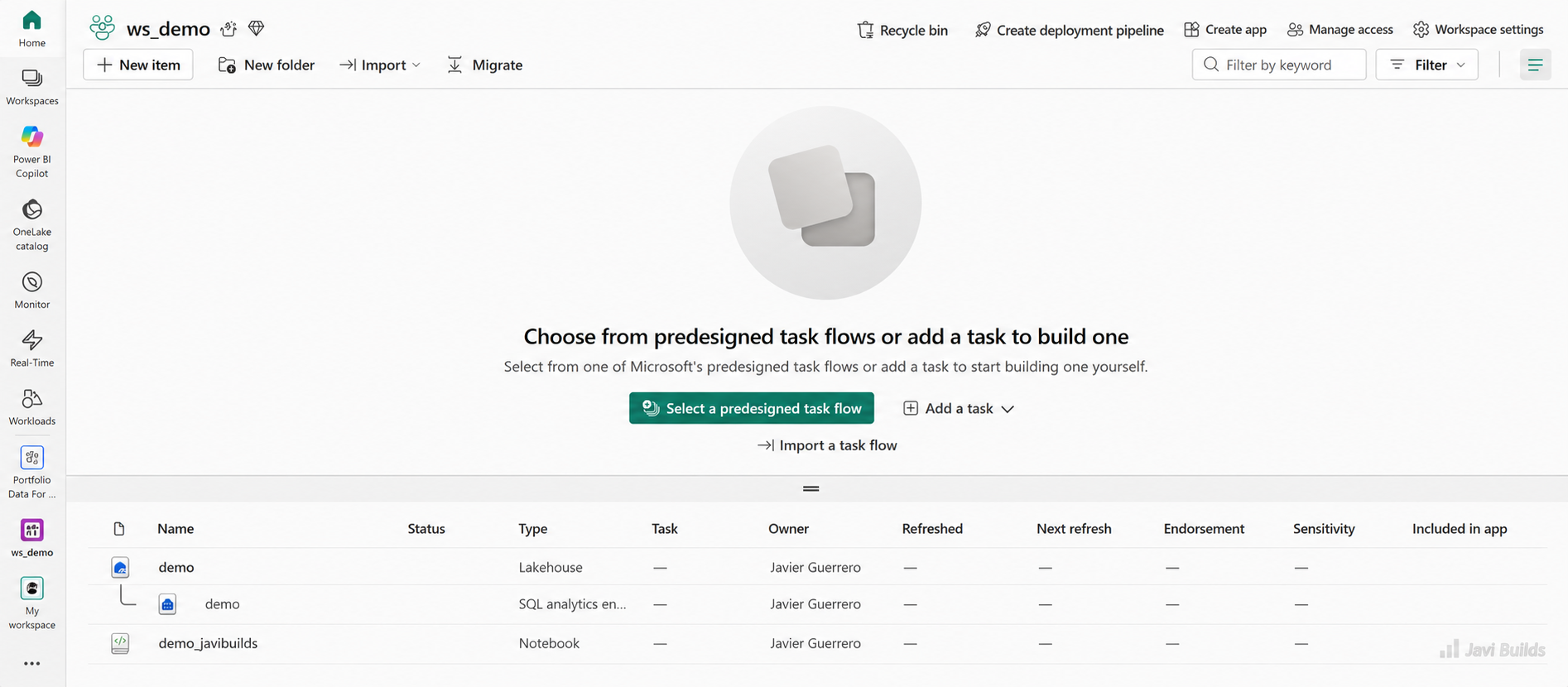
A Fabric workspace groups related items such as Lakehouses, SQL analytics endpoints, notebooks, pipelines, semantic models, and reports.
The item list shows each item’s type and owner. The toolbar above it holds the workspace-level controls used later in this tutorial: Manage access for roles, and Workspace settings for the workspace type, capacity and Git integration.
That third job is why workspace design matters. Source control and deployment in Fabric are organized by workspace, so the boundaries you draw now shape how you will ship changes later.
Workspace vs OneLake
OneLake is the single data lake for the whole tenant. A workspace is a top-level folder in it. When you create jb-fabric-dev, Fabric creates a matching location in OneLake; a Lakehouse called lh_learning inside it lives under that folder.
So you do not “connect” a workspace to storage. Storage comes with it, and every Lakehouse or Warehouse you create there writes its data into the workspace’s part of OneLake.
Workspace vs capacity
Capacity is the compute that runs everything. A workspace is assigned to exactly one capacity at a time, and many workspaces can share the same capacity.
Tenant
- OneLakeOne logical lake
- Tenant settingsWho can do what
Capacity
- F SKU or trialShared compute (CUs)
Workspaces
- jb-fabric-dev
- data-platform-test
- data-platform-prod
Items
- Lakehouse
- Notebook
- Pipeline
- Semantic model
Two consequences are worth remembering:
- Capacity is shared. If
jb-fabric-devand a production workspace share a capacity, a heavy experiment in development can slow down production reports. Many teams give production its own capacity for exactly this reason; Microsoft Fabric Capacity Explained covers when that isolation pays off. - Capacity can change. A workspace can be reassigned to another capacity later, by a workspace admin with access to that capacity. That makes it easy to start on a trial and move to a paid F SKU.
To create Lakehouses, notebooks and other non-Power BI items, the workspace must be on a Fabric capacity: an F SKU, a Power BI Premium P SKU, or a Fabric trial. A workspace on a Power BI Pro or Premium Per User workspace type can only hold Power BI items.
Workspace roles
Fabric has four workspace roles. Each role includes everything in the roles below it.
| Role | Typical use | Key abilities | Cannot |
|---|---|---|---|
| Admin | Workspace owners (two at most, ideally a group) | Everything: update or delete the workspace, add or remove anyone including other admins, connect the workspace to Git | Nothing within the workspace |
| Member | Lead engineers who also manage access | Create and edit items, share items, add Members, Contributors and Viewers | Delete the workspace, remove Admins, connect Git |
| Contributor | Engineers and developers | Create, edit, delete and run items: notebooks, pipelines, Lakehouses, Warehouses | Add people or reshare items by default |
| Viewer | Testers, analysts, stakeholders | View items and run results, read data through the SQL analytics endpoint | Edit or run items, read Lakehouse data through Spark or OneLake |
The Viewer row deserves attention. A Viewer can query Lakehouse tables with T-SQL through the SQL analytics endpoint, but cannot read the underlying files through Spark or the Lakehouse explorer. That is useful for analysts who should query curated tables, but surprising if you expected Viewer to mean “can see everything”.
Roles can be assigned to individuals, Microsoft Entra security groups, Microsoft 365 groups and distribution lists. Assign roles to groups. When someone joins or leaves a team, you change group membership once instead of hunting through workspaces.
Naming conventions
Names show up in OneLake paths, Git folders, deployment configuration and SQL connection strings. Pick a convention before you create anything.
For this learning path:
Workspace:   jb-fabric-dev
Lakehouse:   lh_learning
Notebook:    nb_first_sales
A production organization usually encodes the platform or domain and the environment:
data-platform-dev
data-platform-test
data-platform-prod
or, with several domains:
sales-analytics-dev
sales-analytics-test
sales-analytics-prod
Practical rules:
- Put the environment last (
-dev,-test,-prod), so workspaces for the same solution sort together. - Use lowercase and hyphens for workspaces, and lowercase with underscores for items that become table or path names. Spaces work in workspace names, but they make paths and scripts harder to read and type.
- Prefix items by type (
lh_,wh_,nb_,pl_,sm_). In a workspace with fifty items, the prefix tells you what you are looking at in Git diffs and deployment logs, not only in the portal. - Keep names identical across environments except for the environment suffix on the workspace. Deployment tools map items by name;
lh_salesin dev should belh_salesin production.
Before you start
You need:
- Access to Microsoft Fabric with a work or school account.
- Permission to create workspaces. Tenant administrators control this with a tenant setting; if you cannot find the option to create a workspace, ask them.
- A Fabric capacity you can assign, or a Fabric trial. If you are learning on your own, the trial is the simplest option.
Create the development workspace
-
Open the Fabric portal and open the Workspaces list from the navigation pane.
-
Choose the option to create a new workspace. At the time of writing it sits at the bottom of the Workspaces pane.
-
Enter the name
jb-fabric-dev. Workspace names must be unique. Choose a name that states purpose and environment rather than a person:jb-fabric-dev,data-platform-devoranalytics-devare sensible examples, while a personal name such asjavi-teststops making sense as soon as a team depends on the workspace. -
Add a description that tells a stranger what this workspace is for and who owns it, for example:
Development workspace for the Javi Builds Fabric learning path. Owner: Javi. Not for production data. -
Leave Domain empty unless your organization uses domains. Domains group workspaces by business area in the OneLake catalog; they matter more in production than in a personal learning workspace.
-
Open the advanced settings:
- Contact list: by default, the creator is the contact. In a team, add the group that owns the workspace so notifications do not depend on one person.
- Workspace type (older documentation calls it the license mode): choose a type backed by a Fabric capacity, either your capacity or the Fabric trial, and select the capacity if prompted. This is the setting that allows Lakehouses and notebooks.
- Leave the remaining options at their defaults. They are mostly Power BI settings you do not need here.
-
Apply the settings to create the workspace.
Fabric creates the workspace and opens it. It is empty, which is exactly what you want before connecting Git in the next tutorial.
Check the capacity assignment
Open Workspace settings from the workspace toolbar and find the workspace type. Confirm that the workspace uses a Fabric capacity or the trial, and note which capacity it is. If creating a new item in the workspace offers Lakehouse and Notebook, the assignment is working.
Know this before you run anything heavy. The capacity determines the compute available to every item in the workspace, and in many organizations development and production run on different capacities.
Grant access deliberately
Open the workspace’s access management (Manage access in the workspace toolbar at the time of writing). You are already an Admin. For a team workspace:
- Add the owning group as Admin, so the workspace never depends on one person’s account.
- Add the engineering group as Contributor.
- Add reviewers or analysts as Viewer only if they need to see development work.
For a personal learning workspace, you can leave it as it is.
Recommended settings for a development workspace
| Area | Recommendation | Why |
|---|---|---|
| Capacity | A trial or a small F SKU dedicated to development, paused outside working hours if possible | Keeps experiments away from production and keeps cost predictable |
| Permissions | Groups, not individuals. Two Admins at most; engineers as Contributor | Limits who can change access, delete the workspace or reconnect Git |
| Git integration readiness | Start empty, make sure you are Admin, and check that the tenant allows Git integration | Connecting an empty workspace to Git avoids a sync-direction decision on day one |
| Naming | Environment suffix on the workspace, type prefixes on items | Names propagate into OneLake paths, Git folders and deployment mappings |
| Description | Purpose, owner, and what must not be stored there | The first thing a colleague reads when they find the workspace |
| Ownership | A named owner and an owning group in the contact list | Somebody must be responsible for cost, access and clean-up |
Git integration is configured per workspace, from Workspace settings. The workspace boundary you choose now therefore becomes the boundary of what is committed and deployed together later. The next tutorial covers the connection itself.
Why separating dev, test and production matters
- data-platform-devDevelopmentEdit and experiment
- data-platform-testTestValidate with realistic data
- data-platform-prodProductionOnly deployed changes
When development and production share a workspace, every edit is a production change. Someone renames a column in a notebook to try something, and the nightly load breaks. There is no record of what changed, no review, and no way to test before users see it.
Separate workspaces give you:
- Isolation: experiments cannot break what users rely on.
- Different access: engineers are Contributors in dev; in production, very few people, or only a deployment identity, can change items.
- Different capacity: production reporting does not compete with development workloads.
- A deployment path: changes are committed in dev, reviewed in Git, and promoted to test and production by a repeatable process.
For a learning path, one development workspace is enough. Just build the habit of thinking of it as the first of several. When you get to deployment, Microsoft Fabric CI/CD with fabric-cicd shows how the same items are promoted to the other environments.
Common mistakes
- Giving everyone Admin. Admins can delete the workspace, remove other people and reconnect Git. Most people need Contributor.
- Building everything in one workspace. One workspace for every team, domain and environment becomes impossible to secure, deploy or clean up. Split by solution and environment.
- Mixing dev and production artifacts. A notebook called
nb_load_sales_testnext tonb_load_salesin production is a sign that development is happening in the wrong place. - Not planning capacity. Putting development, heavy Spark jobs and executive reports on one small capacity leads to throttling at the worst moment.
- No naming convention. Renaming items after Git and deployment are set up is painful, because names appear in paths, mappings and connection strings.
- Assigning roles to individuals. It works for a week. After a few people join and leave, nobody knows why someone still has access.
- No owner. Workspaces without an owner accumulate cost and stale items, and nobody can say whether they are safe to delete.
What you learned
- A workspace is a container, a security boundary and the unit you assign to capacity, connect to Git and deploy.
- A workspace is a folder in the tenant’s OneLake; capacity is the compute it runs on, and several workspaces can share one capacity.
- The four roles are Admin, Member, Contributor and Viewer. Assign them to groups and keep Admin rare.
- A naming convention with environment suffixes and item-type prefixes pays off in Git, deployment and OneLake paths.
- You created
jb-fabric-devon a Fabric capacity, ready to be connected to Git while it is still empty.
Next: Connect Microsoft Fabric to Git
Your workspace is empty and assigned to a capacity, the ideal state for connecting source control. In the next tutorial you connect jb-fabric-dev to a Git repository and learn how workspace changes become commits: Connect Microsoft Fabric to Git.
Previous step: What Is Microsoft Fabric? A Practical Overview. Full sequence: Microsoft Fabric learning path.
Was this helpful?
What could be better?
Thanks — that helps me improve Javi Builds.
Continue learning
- Cheat sheetMicrosoft Fabric Workspace Settings Cheat SheetThe Microsoft Fabric workspace settings that change how a data engineering workspace behaves: Spark pools, environments and jobs, domain assignment, OneLake shortcut caching and diagnostics, and data workflow (Apache Airflow job) runtime pools, with what to verify for each.Open cheat sheet
- ArticleDelta Tables in Microsoft Fabric for SQL Server EngineersWhat a Delta table really is, how it differs from a SQL Server table, and what to understand about writes, keys, time travel, maintenance and the SQL analytics endpoint before using Fabric Lakehouse tables in production.Read article
What should I build next?
I'm building Javi Builds around practical problems data engineers actually face. Tell me what you'd like to see next.
Stay in the loop
Get the Javi Builds updates you actually care about.
Check your inbox
I sent you a confirmation link. Your subscription will be active after you confirm it.