SQL Server
Sorting Data with ORDER BY in SQL Server
Sort SQL Server query results with ORDER BY, ASC and DESC, multiple sort keys, aliases, expressions and TOP using dbo.Customers.
On this page
Rows have no guaranteed order unless your query says ORDER BY. SQL Server may appear to return a familiar sequence because of an index or today’s execution plan, but that is not a promise. If a report, export or application needs a particular order, state it in the query. This lesson follows filtering with WHERE in SQL Server Foundations.
Ascending order
ASC means ascending: text alphabetically, numbers from low to high, and dates from early to late. It is the default, so these queries are equivalent:
SELECT CustomerId, FirstName, LastName, State
FROM dbo.Customers
ORDER BY LastName;SELECT CustomerId, FirstName, LastName, State
FROM dbo.Customers
ORDER BY LastName ASC;The ten demo customers appear by surname, Carter through Wu. ORDER BY belongs at the end of a SELECT statement, after WHERE and any grouping.
An alphabetical order is based on the database collation, which defines comparison rules such as case and accent sensitivity. Most installations sort uppercase and lowercase letters together, but a different collation can change the visible sequence. For normal learning queries, use the order SQL Server returns under your database settings; when an exact business order is required, make the rule explicit rather than relying on assumptions about letters.
- Rows from dbo.Customers
- ORDER BY State, LastName
- Result in requested order
Descending and multiple sort keys
Use DESC for descending order. The newest customer is first:
SELECT CustomerId, FirstName, LastName, CreatedDate
FROM dbo.Customers
ORDER BY CreatedDate DESC;Every CreatedDate in this sample is different, so these rows have a unique order. When two rows share the first sort value, add a second key to decide their order within that tie:
SELECT CustomerId, FirstName, LastName, State
FROM dbo.Customers
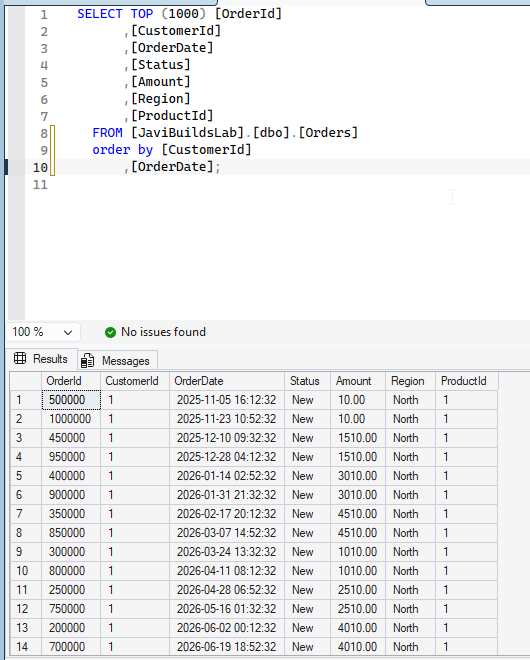
ORDER BY State ASC, LastName ASC, FirstName ASC;This SSMS example uses dbo.Orders in JaviBuildsLab and sorts by CustomerId, then OrderDate.
The screenshot below uses the lab’s Orders table and sorts by CustomerId, then OrderDate:
sql SELECT OrderId, CustomerId, OrderDate, Status, Amount, Region, ProductId FROM dbo.Orders ORDER BY CustomerId, OrderDate;
SQL Server sorts by State first. Within each state, it sorts by LastName, then FirstName for any remaining ties. Each key can have its own direction. For repeatable output, add enough keys to uniquely order rows; a primary key is a common final tie-breaker.
Think of the list from left to right as priorities. A change in State decides first. LastName is examined only when two rows have the same State; FirstName is examined only when both earlier values tie. The third key does not globally sort all first names. Use one key per meaningful priority and put each on its own line. That formatting makes it easier to spot a missing comma, direction, or final key during review.
Date columns sort chronologically when they use a date or date-time data type. A text column that merely looks like a date sorts as characters and may not be chronological. Prefer proper data types at the point where data is stored. Similarly, numeric columns sort by value, while numeric-looking text sorts according to character rules. For example, the text value 100 may appear before 20 because the first character 1 precedes 2. A query should not need to convert such values repeatedly; store measurements and quantities in numeric columns.
Sorting by an alias or expression
Lesson 5 introduced logical processing: SELECT names are available to ORDER BY, which is processed after SELECT. So a column alias works here:
SELECT FirstName + ' ' + LastName AS FullName, State
FROM dbo.Customers
ORDER BY FullName;A simple expression can also be the sort key:
SELECT FirstName, LastName, CustomerId
FROM dbo.Customers
ORDER BY LastName + FirstName;Expressions should remain understandable; a named alias is often clearer. NULL values have SQL Server ordering behavior that can place them differently depending on direction. Lesson 8 explains missing values in detail.
TOP means most recent only with ORDER BY
TOP limits how many rows SQL Server returns. To get the five most recently created customers, define “most recent” explicitly:
SELECT TOP (5)
    CustomerId,
    FirstName,
    LastName,
    CreatedDate
FROM dbo.Customers
ORDER BY CreatedDate DESC;This returns IDs 10 through 6 in the demo data. TOP (5) without ORDER BY selects five rows but does not mean “latest”; there is no guaranteed order or selection rule.
If several customers share the date at the cutoff, TOP (5) can include any tied customer unless you provide another ordering key. ORDER BY CreatedDate DESC, CustomerId DESC defines which tied row comes first. SQL Server can support TOP (5) WITH TIES when the goal is to include every row tied at the boundary, but that returns more than five rows and is a different requirement. For the beginner pattern, order by the requested value and add a unique key when exactly five reproducible rows matter.
Common mistakes and practice
Do not assume a table’s storage order, forget a tie-breaker, or trust the order shown by a user interface when the SQL query has no ORDER BY. Numeric-looking text sorts as text: '100' can come before '20'. Store quantities as numeric data when numeric ordering matters.
Keep the requested ordering close to the end of the query, where readers expect it. Indent a long list consistently and include ASC when it clarifies a mixed-direction sort, even though it is optional. Sorting is part of the query result contract: an application can request rows in one order, but a grid or report may apply a second presentation sort. If the screen appears different from the query, check both the SQL and the user interface. For paging through results, a stable order is especially important; otherwise rows can shift between pages when ties are resolved differently.
Try these, then compare with the answers: (1) list customers by LastName descending; (2) sort by State and then FirstName; (3) return the three oldest customers; (4) sort full names by alias; (5) sort by CreatedDate descending and CustomerId descending as a tie-breaker.
Practice answers
-- 1
SELECT CustomerId, LastName FROM dbo.Customers ORDER BY LastName DESC;
-- 2
SELECT CustomerId, State, FirstName FROM dbo.Customers ORDER BY State, FirstName;
-- 3
SELECT TOP (3) CustomerId, FirstName, CreatedDate FROM dbo.Customers ORDER BY CreatedDate ASC;
-- 4
SELECT FirstName + ' ' + LastName AS FullName FROM dbo.Customers ORDER BY FullName;
-- 5
SELECT CustomerId, CreatedDate FROM dbo.Customers ORDER BY CreatedDate DESC, CustomerId DESC;Next, understand NULL: missing values affect filters and expressions. Visit the Foundations roadmap.
Check what you learned
2 quick questions
SQL Server Foundations
Lesson 7 of 25
Was this helpful?
What could be better?
Thanks — that helps me improve Javi Builds.
Continue learning
- Cheat sheetCheck SQL Server Table SizesMeasure SQL Server table row counts and storage usage, separate data from index space, and identify which tables are driving database growth.Open cheat sheet
- RoadmapSQL Server FoundationsSort SQL Server query results with ORDER BY, ASC and DESC, multiple sort keys, aliases, expressions and TOP using dbo.Customers.View roadmap
What should I build next?
I'm building Javi Builds around practical problems data engineers actually face. Tell me what you'd like to see next.
Stay in the loop
Get the Javi Builds updates you actually care about.
Check your inbox
I sent you a confirmation link. Your subscription will be active after you confirm it.