SQL Server
Understanding NULL in SQL Server
Learn what NULL means in SQL Server, how IS NULL and IS NOT NULL work, why = NULL fails, and how COALESCE and COUNT handle missing data.
On this page
A missing email is different from an empty email address. In SQL Server, NULL represents a value that is missing or unknown. It is not zero, false, an empty string, or the four letters “NULL”. This lesson builds on ORDER BY sorting and WHERE filters in SQL Server Foundations, then prepares you to combine customer and order data in the next lesson.
Find missing values
Use IS NULL to find customers without an email. The sample returns Isla Brooks:
SELECT CustomerId, FirstName, LastName, Email
FROM dbo.Customers
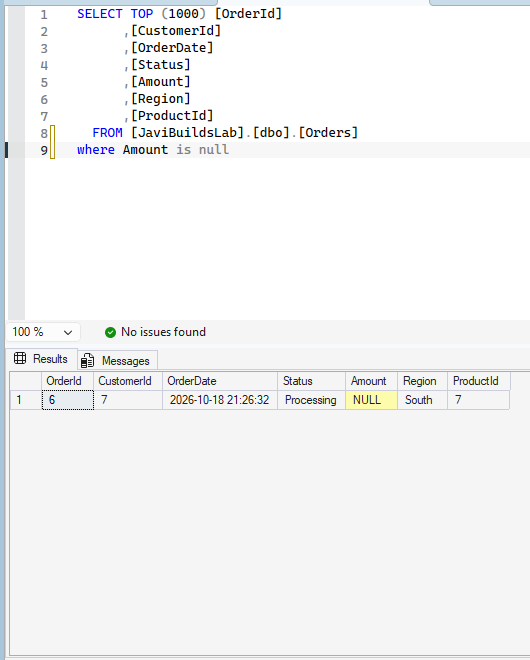
WHERE Email IS NULL;This SSMS capture uses dbo.Orders in JaviBuildsLab and finds the row whose Amount is NULL.
In the SSMS capture, the lab checks its nullable Orders.Amount column:
sql SELECT OrderId, CustomerId, OrderDate, Status, Amount, Region, ProductId FROM dbo.Orders WHERE Amount IS NULL;
For dbo.Customers, IS NOT NULL finds the other nine customers:
SELECT CustomerId, FirstName, LastName, Email
FROM dbo.Customers
WHERE Email IS NOT NULL;- Known value Miami
- Empty string
- NULL unknown or missing
- IS NULL selects missing emails
These states differ. An empty string is a known value containing zero characters. NULL says no value is available or known. It is not zero, false, or the text NULL.
This difference can affect real business rules. A blank email might mean that someone deliberately cleared the field, while NULL might mean it has never been collected. If both cases need different treatment, do not convert one into the other just to make a report look tidy. First decide what each state means to the application and people using the data. SQL Server stores a NULL marker separately from ordinary character values, so a test for the empty string will not find NULL rows, and IS NULL will not find empty strings.
Why equals NULL does not work
This is incorrect for testing a missing value:
-- Incorrect: comparison with NULL is unknown, not true
WHERE Email = NULL
A comparison involving NULL is generally unknown, not true or false. SQL Server uses this third outcome alongside true and false. WHERE keeps only rows where its condition is true, so unknown rows do not pass. Use IS NULL, not = NULL.
The same reasoning affects other conditions. Email <> 'ana.torres@example.com' does not include Isla: SQL Server cannot tell whether her unknown email differs from Ana’s. Add OR Email IS NULL if the goal includes missing addresses.
This is why a filter may return fewer rows than a reader expects. WHERE State <> 'FL' sounds like “everything except Florida,” but it keeps only rows for which the comparison is true. A NULL state is neither known to equal FL nor known to differ from FL, so the predicate is unknown and the row is filtered out. If “not Florida, including an unknown state” is the intended rule, write both parts: WHERE State <> 'FL' OR State IS NULL. When filtering several nullable columns, check each condition against missing values so the result matches the question being asked.
NULL in expressions and COALESCE
In SQL Server, concatenating a string with NULL generally yields NULL under modern CONCAT_NULL_YIELDS_NULL behavior. For example, adding a missing middle name into a full-name expression can make the expression NULL. Choose an explicit fallback when that is the intended presentation.
COALESCE returns the first non-NULL expression:
SELECT FirstName, LastName,
       COALESCE(Email, 'No email') AS EmailDisplay
FROM dbo.Customers;Isla displays “No email”; the other stored addresses remain. This changes only the query result, not the value stored in the table. Use a fallback that is clear to the reader and appropriate for the column’s type.
NULL and counts
COUNT(*) counts rows, whether or not a column is NULL. COUNT(Email) counts only non-NULL email values. In this dataset the first count is 10 and the second is 9:
SELECT COUNT(*) AS CustomerRows,
       COUNT(Email) AS CustomersWithEmail
FROM dbo.Customers;This distinction matters whenever a nullable column is used to measure completeness.
Other aggregates generally ignore NULL inputs too. SUM(Email) is not meaningful because Email is text, but for a numeric nullable column SUM(Amount) adds known amounts and skips unknown ones. That can be useful, but it does not mean an unknown amount should be interpreted as zero. COUNT(*) answers “how many rows are here?”; COUNT(Email) answers “how many rows have a known email?” Those are different questions and should receive different column names in a report.
Common mistakes and practice
Avoid = NULL, treating NULL as blank, replacing missing data before deciding what it means, assuming COUNT(column) equals COUNT(*), and forgetting nullable columns in filters. WHERE State <> 'FL' also excludes NULL states because the comparison is unknown. Include them explicitly when needed.
Avoid replacing NULL with a made-up value too early. A display label such as “No email” is helpful for a person, but if that replacement is used before filtering or grouping it can mix real text with a placeholder and obscure which records are truly missing. Keep the stored value and its meaning intact, then choose a fallback at the point where a human-readable output is needed. Check nullable columns in the table definition or documentation instead of guessing that every row has a value.
Practice: (1) find missing emails; (2) find present emails; (3) display a fallback email label; (4) count rows and known emails; (5) find non-Florida customers while retaining unknown states.
Practice answers
-- 1
SELECT CustomerId FROM dbo.Customers WHERE Email IS NULL;
-- 2
SELECT CustomerId FROM dbo.Customers WHERE Email IS NOT NULL;
-- 3
SELECT COALESCE(Email, 'No email') AS EmailDisplay FROM dbo.Customers;
-- 4
SELECT COUNT(*) AS Rows, COUNT(Email) AS KnownEmails FROM dbo.Customers;
-- 5 (State is NOT NULL for every current demo customer)
SELECT CustomerId FROM dbo.Customers WHERE State <> 'FL' OR State IS NULL;Check what you learned
2 quick questions
SQL Server Foundations
Lesson 8 of 25
Was this helpful?
What could be better?
Thanks — that helps me improve Javi Builds.
Continue learning
- Cheat sheetFind What Is Running in SQL ServerQuickly identify active SQL Server requests, what they are executing, how long they have been running, what resources they are consuming, and whether they are waiting or blocked.Open cheat sheet
- RoadmapSQL Server FoundationsLearn what NULL means in SQL Server, how IS NULL and IS NOT NULL work, why = NULL fails, and how COALESCE and COUNT handle missing data.View roadmap
What should I build next?
I'm building Javi Builds around practical problems data engineers actually face. Tell me what you'd like to see next.
Stay in the loop
Get the Javi Builds updates you actually care about.
Check your inbox
I sent you a confirmation link. Your subscription will be active after you confirm it.