Microsoft Fabric
Mirror Azure SQL Tables into Microsoft Fabric and Query Them from a Notebook
Mirror an Azure SQL Database table into Microsoft Fabric OneLake without a copy pipeline, clear the network and identity prerequisites, and query it from a Fabric notebook with Spark SQL and PySpark.
On this page
Microsoft Fabric Mirroring is a clean way to make operational data from Azure SQL available in OneLake without building and scheduling a traditional copy pipeline.
In this walkthrough, we will mirror a small dbo.tenant table from Azure SQL Database into Microsoft Fabric, verify that changes are replicated, and query the mirrored table directly from a Fabric notebook.
The goal is simple:
- Azure SQL Database
- Fabric MirroringFabric Mirrored Database
- OneLake
- Fabric Notebook
The important architectural point is that Azure SQL remains the operational system of record. Fabric receives a synchronized, read-oriented copy that can be used for analytics, notebooks, reporting, and downstream data engineering.
All screenshots in this article are branded with a Javi Builds watermark and sanitized to remove environment-specific personal information.
Why use Fabric Mirroring?
A common integration pattern is to periodically copy operational tables into an analytics platform with a pipeline.
That works, but for data that should stay synchronized with Azure SQL, Fabric Mirroring can remove a lot of plumbing.
Instead of this:
- Azure SQL
- Scheduled pipelineLanding files
- Lakehouse
you can use:
- Azure SQL
- Continuous mirroringOneLake
This gives you several advantages:
- No custom incremental-copy logic for supported tables.
- No polling pipeline every few minutes.
- Inserts, updates, and deletes can flow automatically.
- The mirrored data becomes available through Fabric and OneLake.
- Fabric notebooks can query the mirrored database directly.
- The Azure SQL database continues to serve the application workload.
For operational application data that also needs to be available to Fabric, this is a very attractive pattern.
1. Create a source table in Azure SQL
For this proof of concept, we used a simple tenant table.
CREATE TABLE dbo.tenant
(
    tenant_id INT NOT NULL PRIMARY KEY,
    tenant_name NVARCHAR(100) NOT NULL,
    status INT NOT NULL,
    created_date DATETIME2 NOT NULL,
    ended_date DATETIME2 NULL
);A sample row can be inserted with:
INSERT INTO dbo.tenant
(
    tenant_id,
    tenant_name,
    status,
    created_date,
    ended_date
)
VALUES
(
    1,
    N'tenant_test',
    1,
    SYSUTCDATETIME(),
    NULL
);For a production design, I would normally use a default constraint for created_date and define the meaning of each status value through either documentation or a reference table.
2. Create the mirrored Azure SQL Database in Fabric
In Microsoft Fabric:
- Open the target workspace.
- Choose New item.
- Select Mirrored Azure SQL Database.
- Enter the Azure SQL server and database.
- Configure the connection.
- Select the tables you want to mirror.
- Create the mirrored database.
For this example, only the following table is needed:
dbo.tenantFabric also offers an option similar to:
Automatically mirror future tablesEnable this only if you actually want new eligible tables created in the source database to be added automatically. For a tightly controlled production environment, I normally prefer explicitly selecting the tables that belong in the mirrored data set.
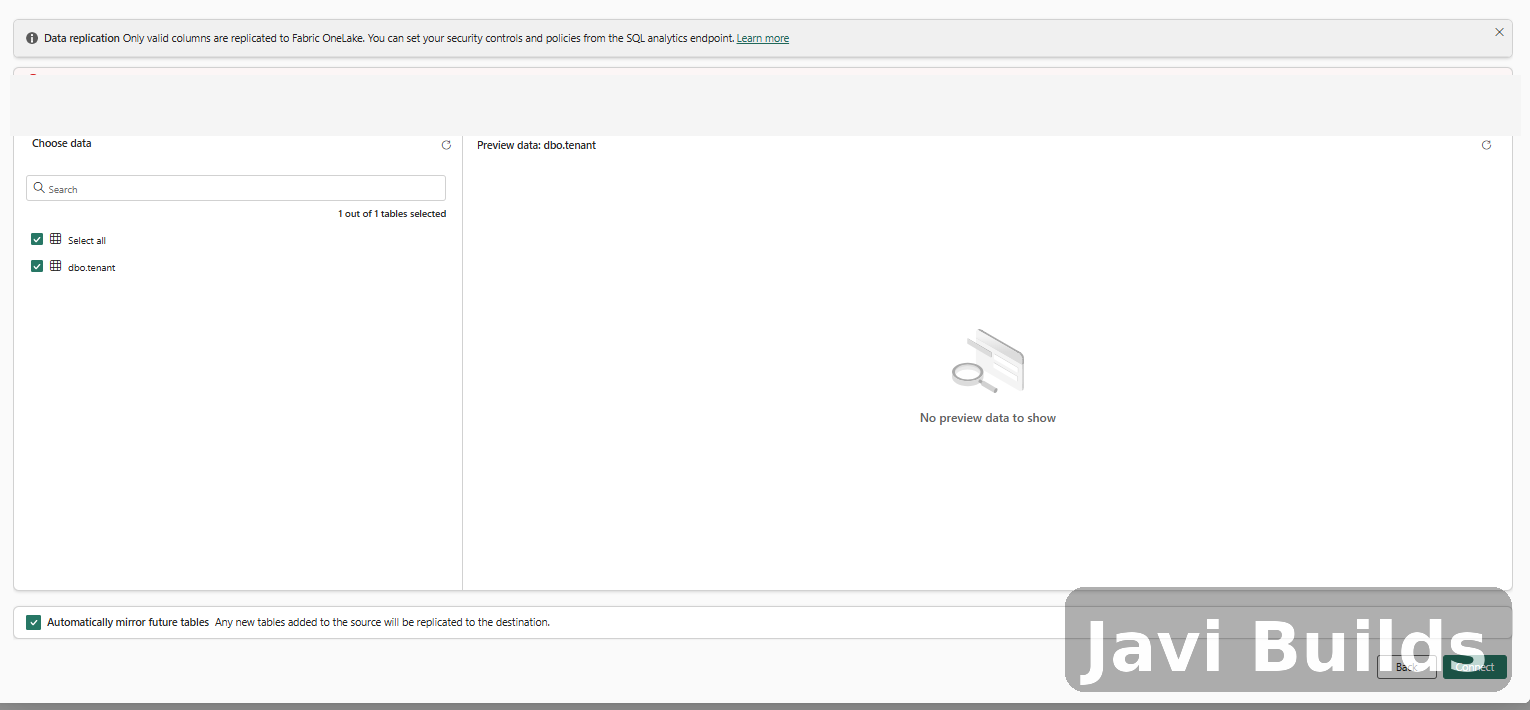
Selecting the Azure SQL table that Fabric will mirror into OneLake.
3. Azure SQL prerequisites you may hit
The mirroring wizard can expose several Azure-side prerequisites that are easy to miss.
During this POC, the important ones were identity, authentication, and network access.
Network access
Fabric must be able to reach the Azure SQL logical server.
If the SQL firewall blocks the connection, you may receive an error similar to:
Client with IP address 'x.x.x.x' is not allowed to access the server.For a quick POC, you can add the required IP address to the Azure SQL server firewall.
For production, evaluate a more controlled networking model such as VNet-based connectivity or private connectivity instead of broadly opening the SQL server.
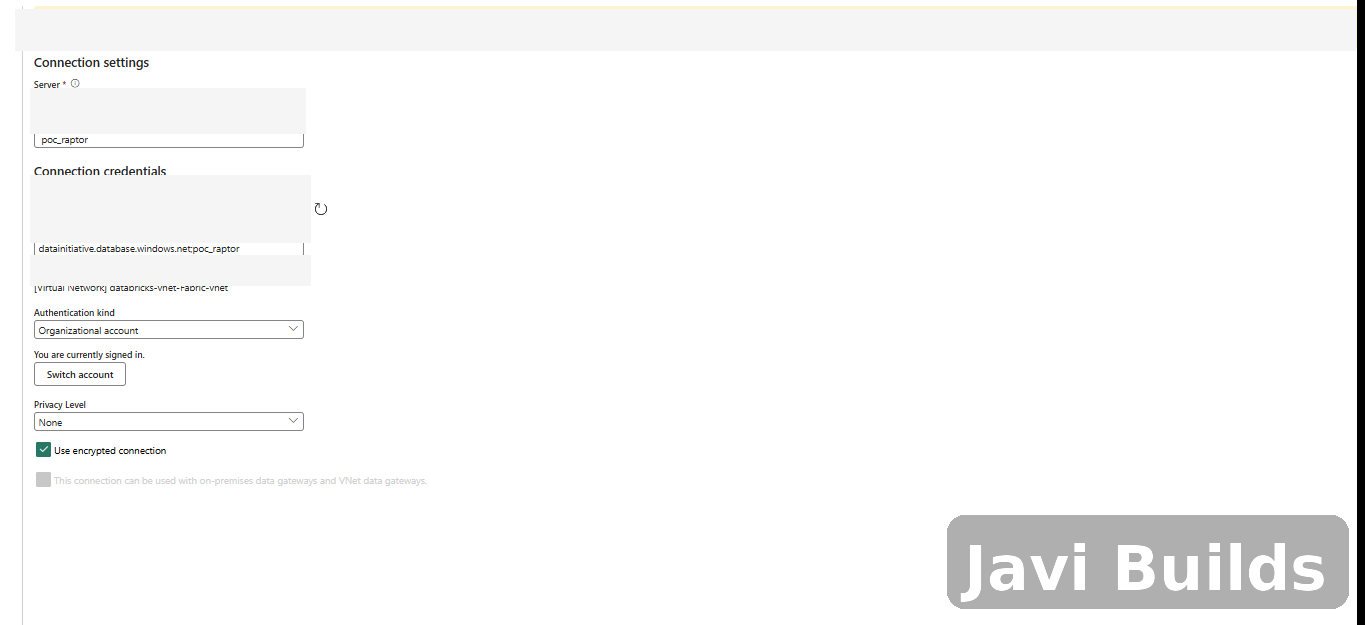
Azure SQL rejecting the connection until the required network access is configured.
4. Configure Microsoft Entra authentication
In environments with stricter Azure Policy controls, you may need to configure Microsoft Entra authentication before enabling the managed identity required by mirroring.
At the Azure SQL logical server level:
SQL logical server
    ↓
Microsoft Entra ID
Make sure a Microsoft Entra administrator is configured.
Depending on organizational policy, you may also need:
Support only Microsoft Entra authentication for this serverBe careful with this setting.
When Microsoft Entra-only authentication is enabled, SQL username/password authentication is disabled for the server. Validate existing application and administrative connections before changing this on a production server.
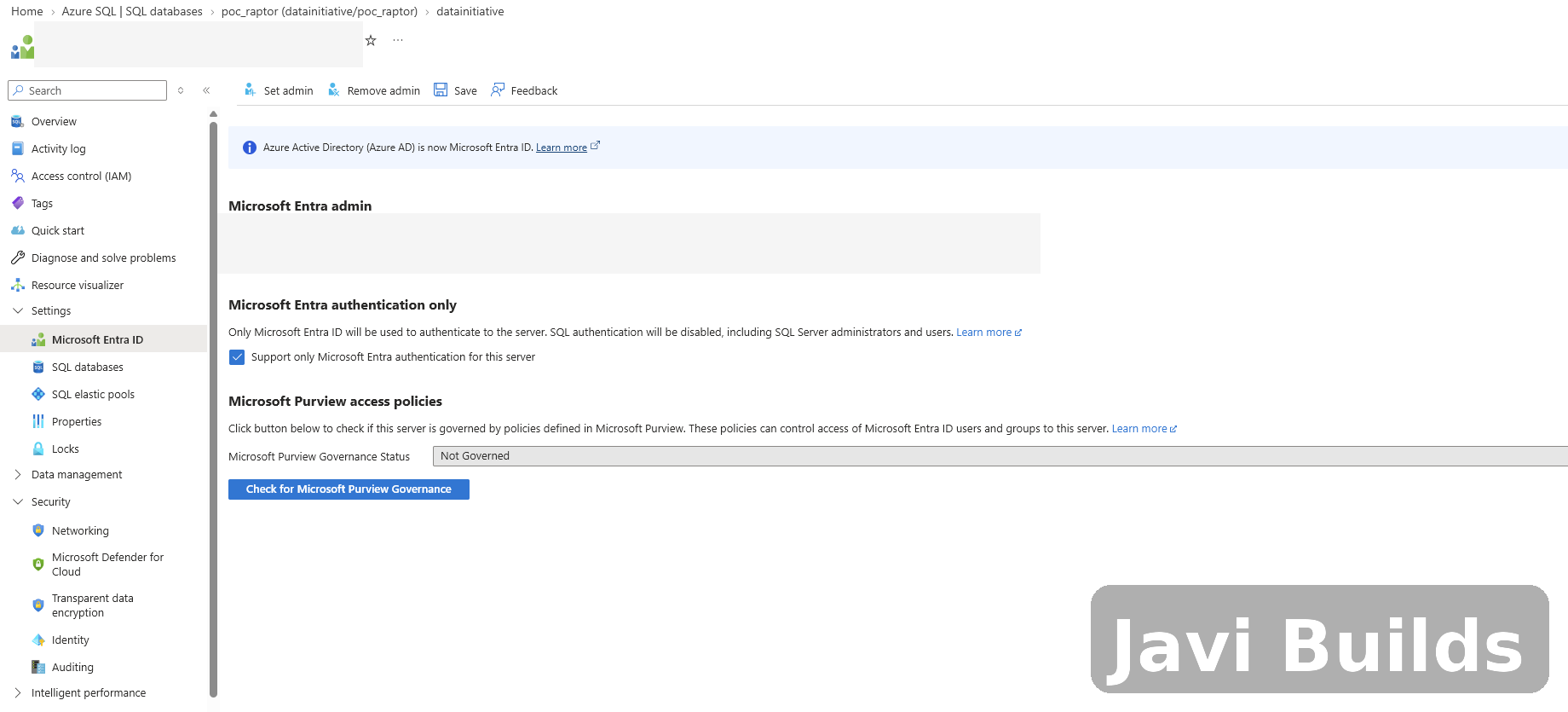
Microsoft Entra authentication settings on the Azure SQL logical server.
5. Enable the SQL server managed identity
Fabric Mirroring also requires the Azure SQL logical server to have a managed identity configured.
Navigate to:
SQL logical server
    ↓
Security
    ↓
Identity
Enable:
System assigned managed identity = OnThe system-assigned managed identity must also be configured as the appropriate primary identity for the SQL server.
If an Azure Policy prevents you from enabling it, check the policy error carefully. In some organizations, a policy may require Microsoft Entra-only authentication to be enabled first.
This dependency is worth documenting because it is not obvious when you first create the mirrored database.
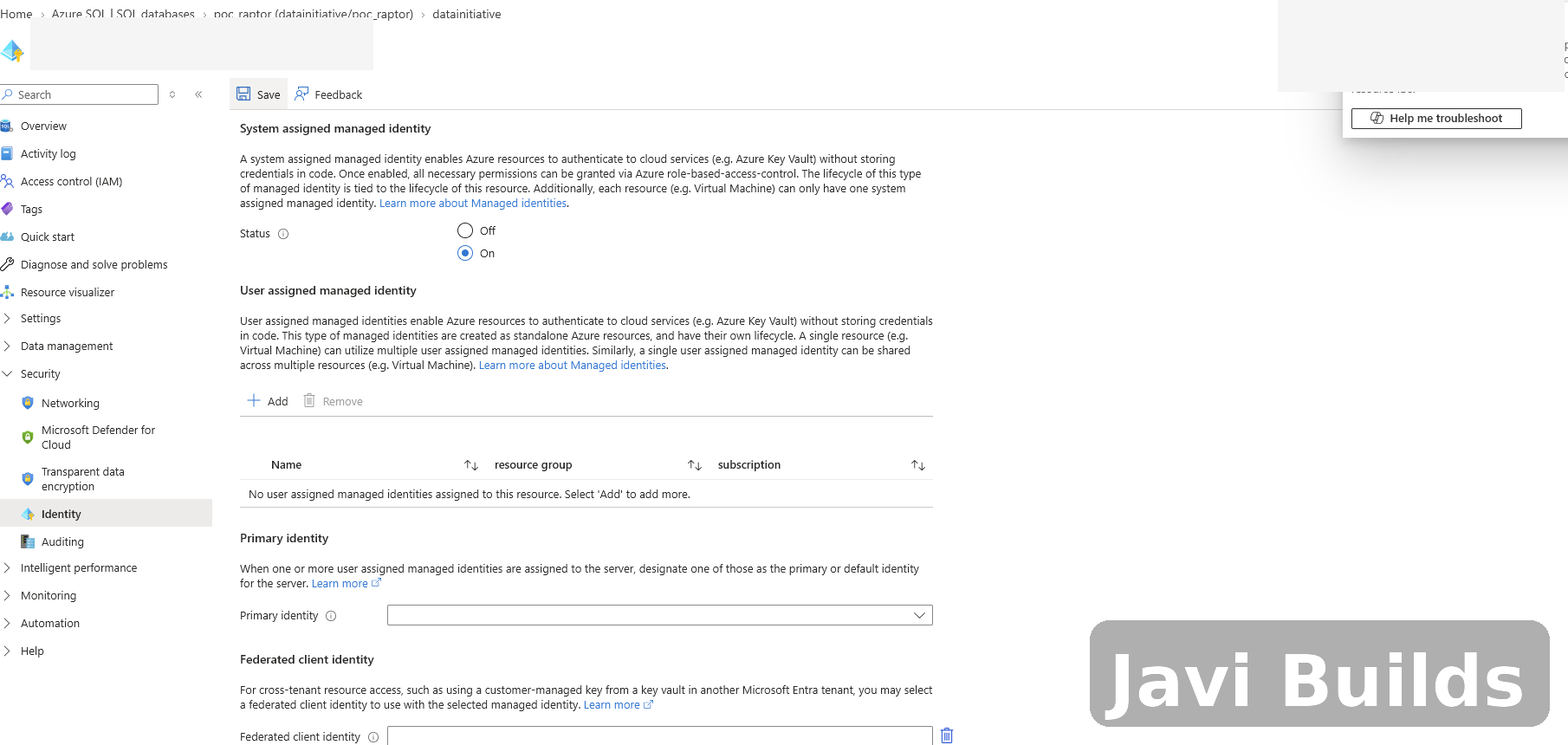
Enabling the system-assigned managed identity required by the mirroring configuration.
6. Create the mirrored database
Once the network and identity requirements are satisfied, return to Fabric and continue the wizard.
Fabric creates a new mirrored database item.
The initial workflow looks roughly like this:
- 1Validate source
- 2Create mirrored database
- 3Initialize replication
- 4Initial snapshot
- 5Continuous replication
During initialization, you may see:
Status: Startingand:
No data has landedThat is expected while the initial synchronization is being prepared.
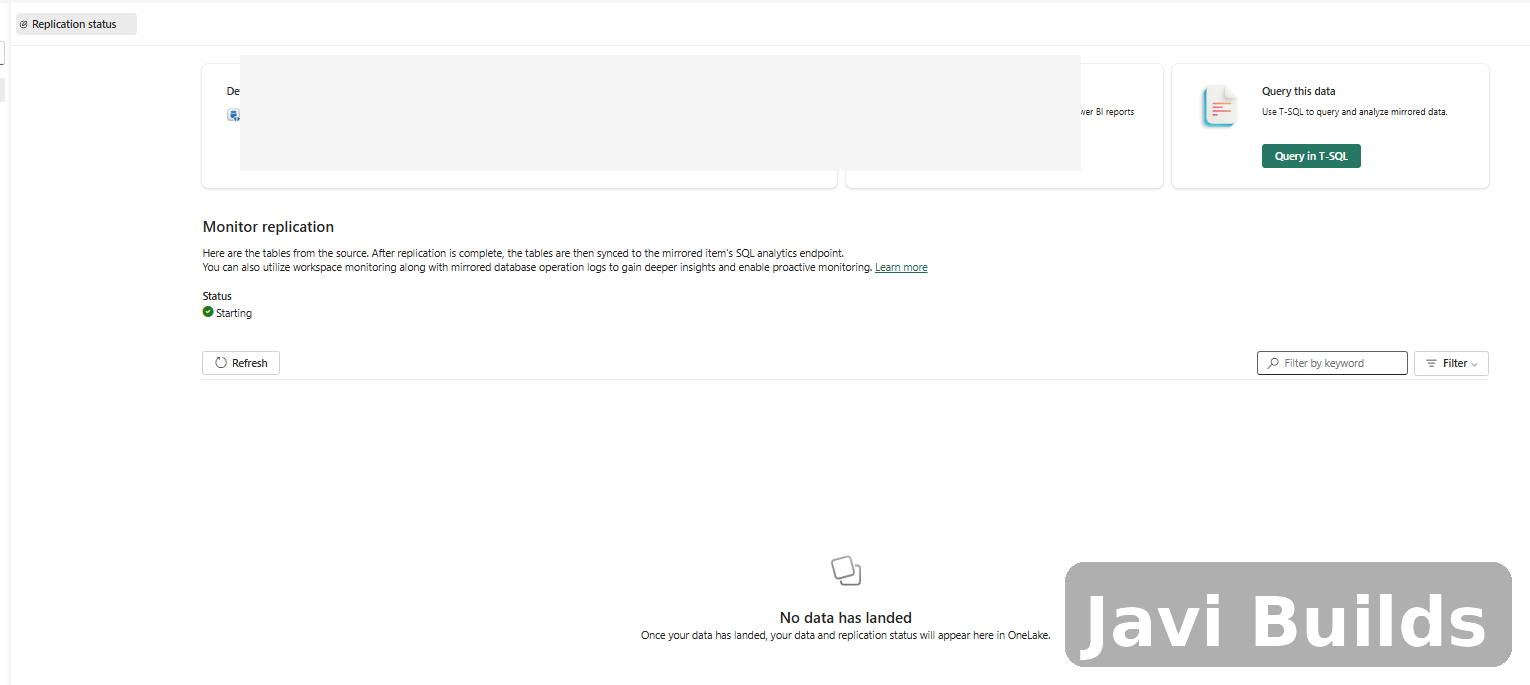
Fabric initializing replication and waiting for the first data to land in OneLake.
7. Understand the Fabric objects that are created
After the mirrored database is created, Fabric exposes more than one related item in the workspace.
You will typically see:
Mirrored database
SQL analytics endpoint
The SQL analytics endpoint gives you a SQL-querying surface over the mirrored data.
The mirrored database itself exposes the replicated tables in OneLake.
This is important because the mirrored item can look similar to a Lakehouse in some parts of the Fabric UI, but it is not simply a normal user-created Lakehouse.
8. Add the mirrored database to a notebook
Create or open a Fabric notebook.
From the Data items pane:
Add data items
    ↓
OneLake catalog
    ↓
Select the mirrored database
After adding it, you should see something similar to:
OneLake
  └─ mirrored_database
      └─ Schemas
          └─ dbo
              └─ Tables
                  └─ tenant
You can expand the table and inspect its columns directly from the notebook explorer.
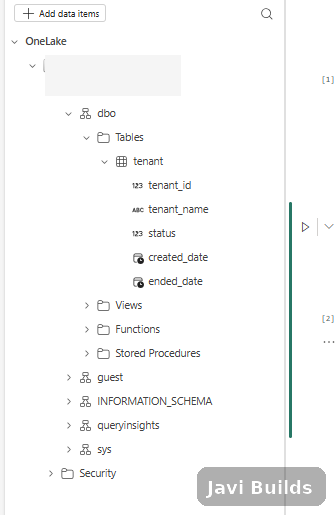
The mirrored dbo.tenant table is available directly from the notebook explorer.
9. Query the mirrored table with Spark SQL
One detail is very important.
If your notebook does not have a default Lakehouse attached, a three-part name such as:
SELECT *
FROM mirrored_database.dbo.tenant;may fail with an error similar to:
No default context found, please attach a lakehouse before running spark sql queries with partial namespaces.You do not necessarily need to attach another Lakehouse.
Use the full four-part object name:
workspace.database.schema.tableFor example:
SELECT *
FROM demo_workspace.demo_mirror.dbo.tenant;This allows the notebook to resolve the mirrored table without relying on a default Lakehouse context.
10. Query the same table with PySpark
The same object can be queried using spark.sql():
df = spark.sql("""
    SELECT *
    FROM demo_workspace.demo_mirror.dbo.tenant
""")

display(df)This gives you a Spark DataFrame that can participate in the rest of your Fabric engineering workflow.
For example:
active_tenants = spark.sql("""
    SELECT
        tenant_id,
        tenant_name,
        created_date
    FROM demo_workspace.demo_mirror.dbo.tenant
    WHERE status = 1
""")

display(active_tenants)From there, you can join the mirrored operational data with other Lakehouse or Warehouse data.
11. Validate continuous replication
Seeing the initial row proves that the snapshot landed.
The more interesting test is proving that subsequent changes are mirrored automatically.
Insert another row in Azure SQL:
INSERT INTO dbo.tenant
(
    tenant_id,
    tenant_name,
    status,
    created_date,
    ended_date
)
VALUES
(
    2,
    N'second_test',
    2,
    SYSUTCDATETIME(),
    NULL
);Then rerun the Fabric notebook query:
SELECT *
FROM demo_workspace.demo_mirror.dbo.tenant
ORDER BY tenant_id;When the second row appears, you have validated the complete path:
- Azure SQL INSERT
- Fabric Mirroring
- OneLake
- Spark SQL / PySpark
No copy pipeline was triggered.
No notebook performed the ingestion.
The source change was replicated by the mirroring service.
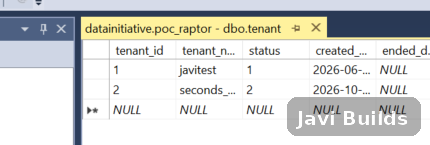
A second row is added to the Azure SQL source table to validate continuous replication.
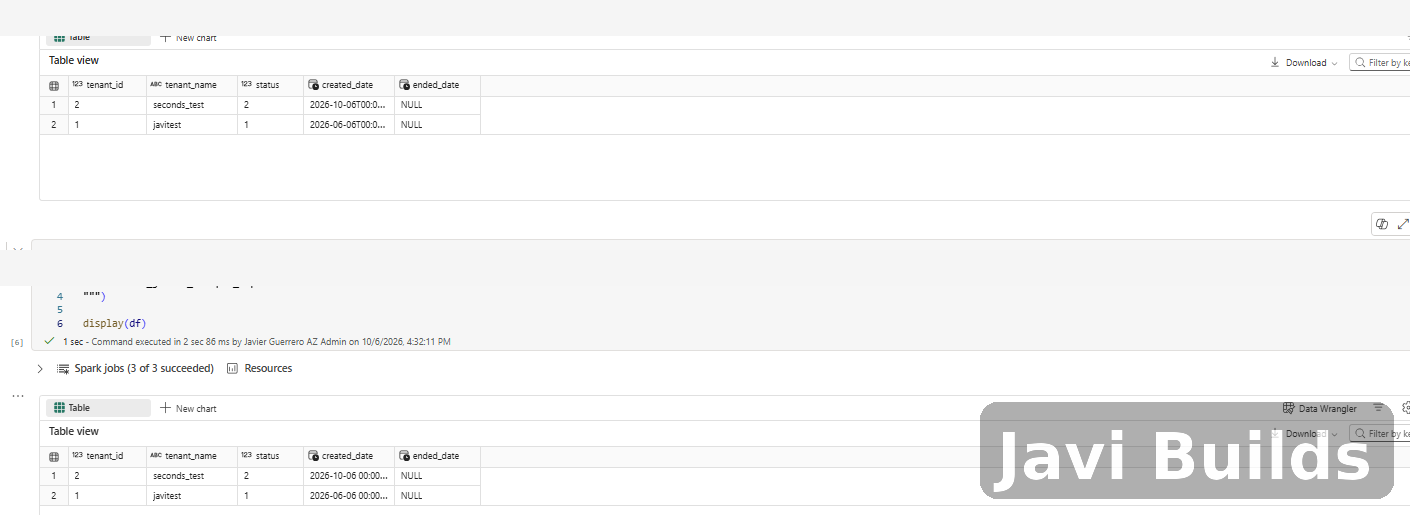
The new Azure SQL row appears in Fabric without running a copy pipeline.
What actually happened?
The final architecture is straightforward:
- Application / API
- Read / WriteAzure SQL DatabaseOperational source of truth
- dbo.tenant
- Fabric MirroringFabric Mirrored DatabaseOneLake synchronized copy
- NotebooksSpark
- SQL Analytics Endpoint
The application should continue to treat Azure SQL as the transactional system.
Fabric should treat the mirrored data as an analytical/read-oriented representation of that operational data.
That separation is important.
Do not design the mirrored copy as the place where your application writes tenant configuration back into Azure SQL.
The flow should remain:
- Application
- Azure SQL
- Mirroring
- Fabric
not:
- Application
- Fabric mirror
- Azure SQL
Where this becomes useful
A small tenant table may not look exciting by itself, but the pattern becomes very useful when you combine operational metadata with large analytical data sets.
Imagine Azure SQL contains:
tenant
merchant
application_configuration
report_configuration
feature_flags
while Fabric contains:
sales
registrations
commissions
clickstream
reporting aggregates
Mirroring lets your Fabric workloads reference relatively small operational/configuration tables without building a separate ingestion pipeline for every one of them.
A notebook could then do something like:
SELECT
    s.tenant_id,
    t.tenant_name,
    SUM(s.amount) AS total_sales
FROM analytics.sales s
JOIN demo_workspace.demo_mirror.dbo.tenant t
    ON s.tenant_id = t.tenant_id
GROUP BY
    s.tenant_id,
t.tenant_name;That is where the pattern becomes especially useful in a multi-tenant architecture.
Production considerations
Mirroring is powerful, but I would still evaluate several things before using it broadly in production.
Table eligibility
Not every SQL Server/Azure SQL feature or data type is necessarily eligible for mirroring. Validate the schema of the tables you intend to replicate.
Networking
Avoid treating a temporary POC firewall rule as the final architecture.
For production, evaluate the appropriate private/VNet connectivity model for your environment.
Authentication
Understand the impact of enabling Microsoft Entra-only authentication before applying it to an existing SQL server.
Identity
Document the SQL logical server’s system-assigned managed identity and the organizational policies that govern it.
Table selection
Decide whether you truly want future tables mirrored automatically.
For controlled production deployments, explicit table selection is often easier to govern.
Read/write responsibilities
Keep the responsibilities clear:
Azure SQL = operational read/write
Fabric mirrored database = analytical read
Replication latency
Treat mirroring as near-real-time rather than assuming synchronous transaction-level behavior between Azure SQL and Fabric.
Downstream processing
Mirroring replaces the extraction step, not the rest of the pipeline. The mirrored table is a current-state replica, so Silver and Gold tables built from it still need their own change detection and idempotent writes. Incremental Loads in Microsoft Fabric covers that downstream half.
Deployment checklist
Here is the checklist I would keep with the implementation:
Azure SQL
[ ] Source database created
[ ] Source tables have supported schemas
[ ] Microsoft Entra administrator configured
[ ] Microsoft Entra-only authentication reviewed/configured if required
[ ] System-assigned managed identity enabled
[ ] Required primary identity configured
[ ] Network access from Fabric validated

Microsoft Fabric
[ ] Mirrored Azure SQL Database created
[ ] Correct source connection selected
[ ] Required tables selected
[ ] "Automatically mirror future tables" decision documented
[ ] Replication status healthy
[ ] Initial data landed in OneLake

Validation
[ ] Mirrored database added to a Fabric notebook
[ ] Four-part Spark object name verified
[ ] Initial snapshot queried successfully
[ ] New source INSERT replicated successfully
[ ] UPDATE replication tested
[ ] DELETE replication tested
Final thoughts
What I like about this pattern is how little custom ingestion code is required.
For this POC, the final workflow was essentially:
- 1Create Azure SQL table
- 2Configure SQL networking + identity
- 3Create Fabric mirrored database
- 4Select table
- 5Wait for initial synchronization
- 6Add mirrored database to notebook
- 7Query with Spark
- 8Change source data
- 9Watch it appear in Fabric
There was no incremental watermark logic, no copy activity to schedule, and no custom CDC process to maintain.
For architectures where Azure SQL owns operational state and Microsoft Fabric owns analytics, Fabric Mirroring gives us a very clean bridge between the two.
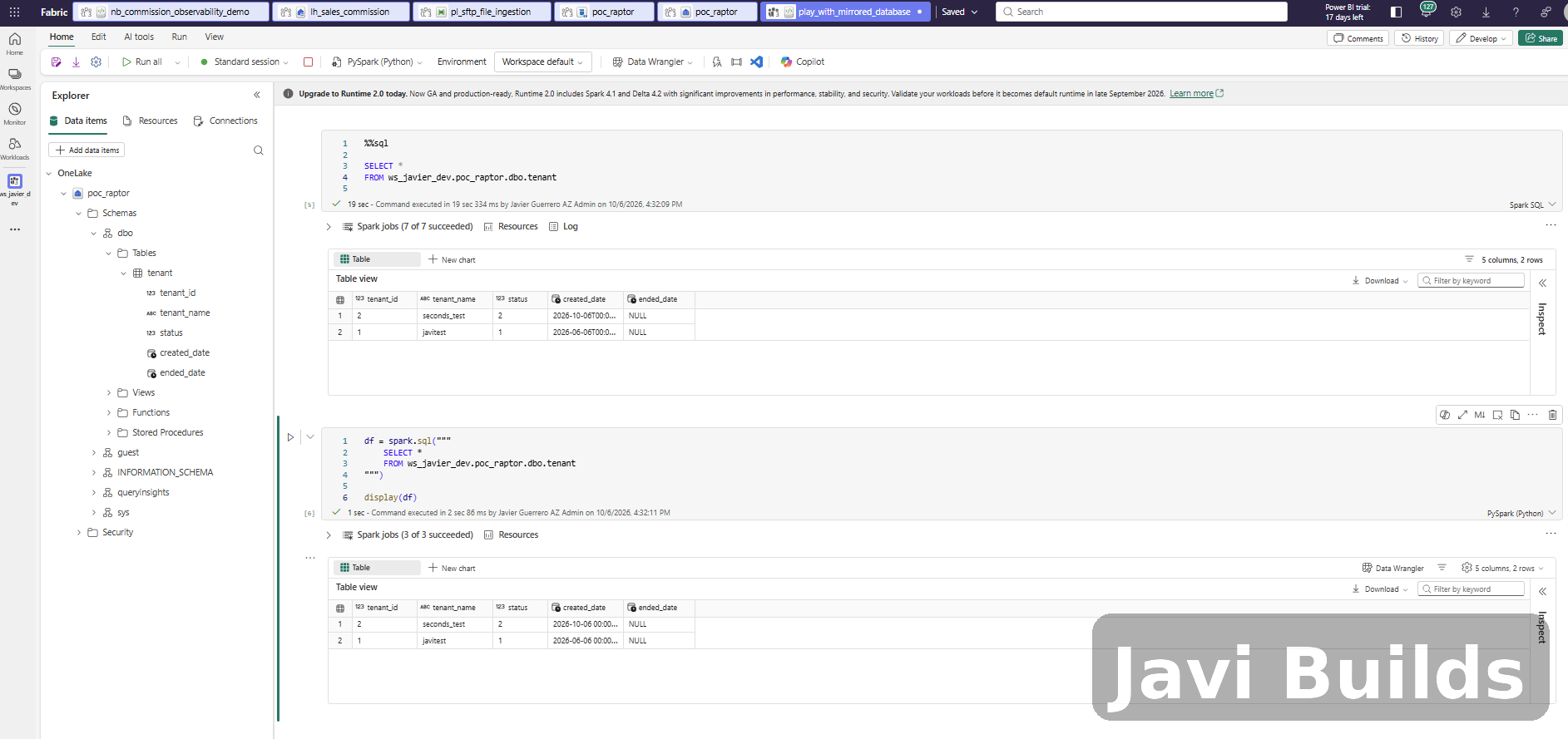
Full notebook view showing the mirrored table queried successfully through both Spark SQL and PySpark.
Was this helpful?
What could be better?
Thanks — that helps me improve Javi Builds.
Continue learning
- ArticleCreate Your First Fabric NotebookCreate a Microsoft Fabric notebook, attach it to a Lakehouse, build a small dataset with PySpark, write it as a Delta table and query it with Spark SQL, with every step explained.Read article
- Cheat sheetKQL for Microsoft Fabric Cheat SheetThe Kusto Query Language (KQL) a Microsoft Fabric data engineer uses most in Eventhouse and KQL querysets: filter, shape, sort, summarize, time windows with bin(), joins, nulls and dynamic fields, with a SQL-to-KQL mapping and seven practice exercises.Open cheat sheet
- ResourceMicrosoft Fabric Certification Study PlannerAn adaptable 6–8 week example plan that connects official Fabric certification objectives with hands-on practice, review, and exam readiness.View resource
What should I build next?
I'm building Javi Builds around practical problems data engineers actually face. Tell me what you'd like to see next.
Stay in the loop
Get the Javi Builds updates you actually care about.
Check your inbox
I sent you a confirmation link. Your subscription will be active after you confirm it.